
The Nissan Ariya at Nissan Visalia is an electric crossover SUV known for its horsepower and unusually long range of battery-only power. Of course, to take advantage of that full range of 200 to 300 miles, you'll want to start with a full charge. Whether you're charging up at home or topping up your battery on the road, the first thing you need to know is how to charge your Nissan Ariya.
Fortunately, like most electric vehicles, the charging routine is simple and easy to do. We'll explain the details of charging the Nissan Ariya and provide a step-by-step guide for proper charging at home and on the road.
Understanding Charging Options
Nissan Ariyas can have one of two battery sizes and can be charged with Level 1, Level 2, and Level 3 chargers.
Charging Levels and Connectors
- Level 1 Charging: 120 V standard outlet charger. Level 1 chargers are most commonly used to charge your vehicle at home. You can also carry one with you for portable charging from any conventional outlet. It can charge your Ariya completely in 10-14 hours.
- Level 2 Charging: 240 V outlet charger. This requires an advanced 240 V outlet and is most commonly found at commercial charging stations. However, you can use one at home with a 240 V high-voltage outlet installed. It takes half the time to charge your Ariya
- Level 3 Charging: 480 V Commercial Quick Charger - Only public commercial charging stations support the 480 V necessary for this rapid charging. They can be found at a public quick charging stations, and charge in 1/4 the time of a Level 1 charger.
Battery Size Options
Nissan Ariyas come with either 63 kWh or 87 kWh batteries. The smaller battery takes less time to charge, while the larger offers more range.
Preparing for Charging
Before you charge, there are two things to check. First, check your battery percentage. This is displayed in the top center of your dash screen, between the clock and the speedometer.
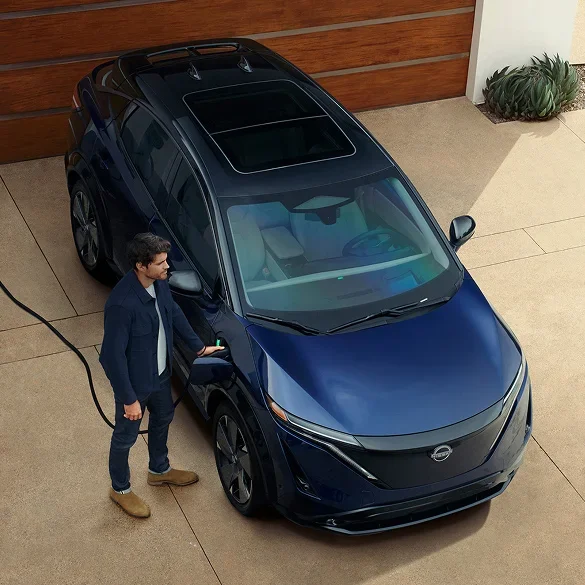
Next, locate your charge port. Unlike other models, the charge port is located at the front, just above the passenger-side front wheel. Drive up to a charging station with this charge port location in mind.
Now, you're ready to charge your Nissan Ariya.
Step-by-Step Charging Process
1. Park and turn off the vehicle
Start by fully turning off your vehicle. The Ariya will not charge if the car is using power.
2. Open the charge port lid and cap
Unlock the doors. Then press the wide end of the charge port lid and it will click open. Remove the cap from the charge port and hang it on the charge port door interior.
3. Plug in the charge connector
Take the charge connector and fit it over the charge port. Apply the top first, and then push down to click it into place. You should now be charging.
4. When fully charged, disconnect and close up.
When the Nissan Ariya is fully charged, it will passively draw power until it is disconnected. Disconnect and close up your charge port cap and lid. Hang the charger in it's storage location.
Monitoring and Managing Charging
You can monitor your Nissan Ariya's charging progress using the NissanConnect EV & Services phone app. This will remotely tell you the battery percentage, plug-in status, and time until full charge completion. This allows you to keep track and return to your car on time if you are using a public charger.
You can also start and stop charging remotely and create a charging schedule for specific times of day, which allows you to charge outside of peak hours without manually disconnecting.
Test Drive a Nissan Ariya at Nissan of Visalia
If you are considering the benefits of a Nissan Ariya as your next vehicle, come and test drive one at Nissan of Visalia. We'll be glad to show you around both new and used options to find the perfect electric vehicle for your needs.
FAQ
What charging levels can the Nissan Ariya use?
The Ariya supports Level 1 (120V), Level 2 (240V), and Level 3 (480V fast charging) options.
How long does it take to charge a Nissan Ariya?
A Level 1 charger takes about 10–14 hours, Level 2 cuts that time in half, and Level 3 quick charging can charge the battery in about a quarter of Level 1 time.
Where is the Nissan Ariya’s charge port located?
The charge port is located at the front of the vehicle above the passenger-side front wheel.
Can I monitor my charging remotely?
Yes. The NissanConnect EV & Services app lets you check charging status, start or stop charging, and set charging schedules.
What battery sizes does the Ariya offer?
The Ariya comes with either a 63 kWh or 87 kWh battery, with the larger battery offering more range.